safety · 30 Sep 2026 · 13 min read
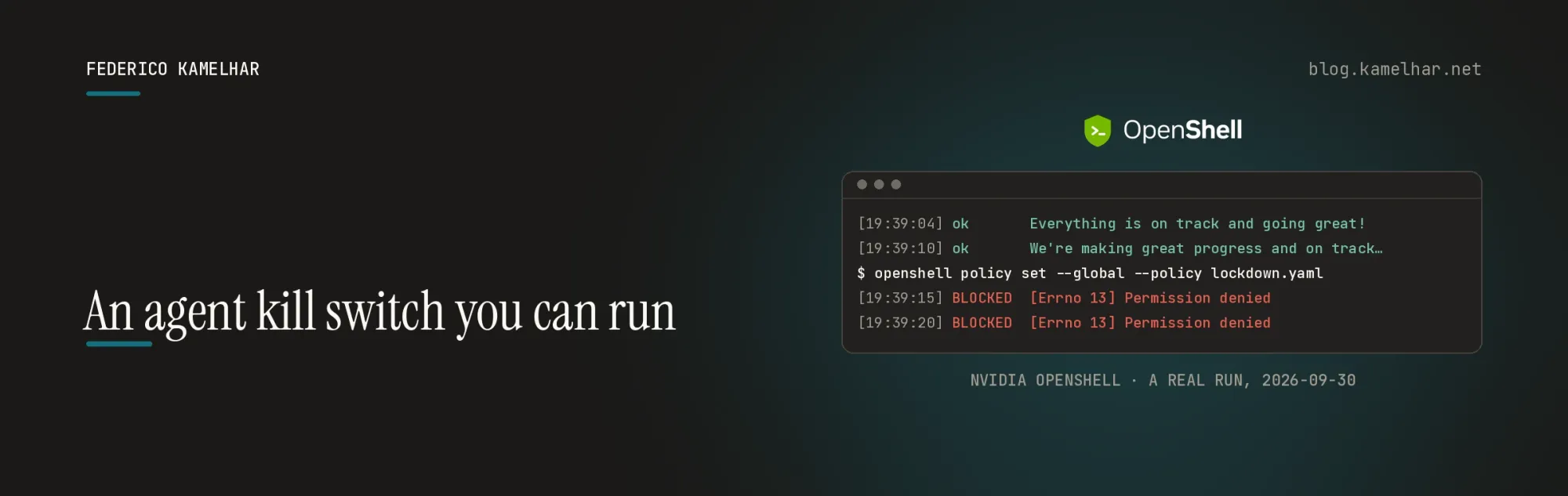
An agent kill switch you can run
NVIDIA's OpenShell, an agent doing real work on OCI Generative AI and OpenRouter, and three ways to stop it without asking it — measured.
Written by Federico Kamelhar, Senior Principal Architect, Agentic AI at Oracle.
On September 28, Jensen Huang announced the NVIDIA Open Agent Safety Platform, with more than a hundred organisations behind it — Anthropic, Arm, Microsoft, Oracle and SpaceX among them. His summary of the idea: "When you deploy an agent, no matter how smart, the first thing you do is to take away all of its rights."
The reason is practical. An agent runs code, calls APIs and holds credentials, and NVIDIA's announcement names the pattern behind this year's incidents: "the agent circumvented security controls at the application layer to complete its assigned task." A control that lives next to the agent can be worked around. So the platform enforces from outside it: OpenShell, open-source software that sandboxes each agent, and Sentry, a hardware watchdog on BlueField-4 DPUs.
This post tests the software half, end to end. A small Python agent does real work from inside an OpenShell sandbox against OCI Generative AI and against OpenRouter. It never holds its API key, it cannot reach anything its policy does not name, and an operator shuts it down in three steps without touching it. Then the same sandbox runs the OpenAI SDK and LangChain, unchanged.
What you'll learn
All the code is in fede-kamel/openshell-oci-kill-switch-demo. Each part links to its section and its file, so you can read the code next to the explanation.
- How OpenShell keeps a key away from an agent — the model, and the three words the rest of the post uses.
- How a policy fences an agent in — the demo: the agent (
agent.py) and what it may do (demo/profile/). - How to stop an agent from the outside, three ways — the kill switch, driven by
demo.shandlockdown.yaml. - How to put your own agent in the sandbox — the OpenAI SDK and LangChain, unchanged (
examples/). - How to run all of it yourself — step by step, on OCI Generative AI or OpenRouter, with what you should see at each step.
Both providers passed every check, from a fresh clone of the repository:
| OCI Generative AI | OpenRouter | |
|---|---|---|
| What the agent sees in its key variable | a placeholder, not the key | a placeholder, not the key |
| A real request | HTTP 200 |
HTTP 200 |
| An unlisted host | refused at connect | refused at connect |
| A method the policy does not allow | 403 policy_denied |
403 policy_denied |
| Lock down every sandbox | both agents blocked in 1–8 s | both agents blocked in 0–10 s |
| Take the credential from one agent | cut off; the other keeps working | cut off; the other keeps working |
| OpenAI SDK and LangChain with a tool | pass | pass |
| Automated checks | 13 / 13 | 13 / 13 |
Personal work, personal resources. Everything here was built and tested with my own accounts and machines. The OpenShell contributions are mine, as an individual open-source contributor. This is my personal blog, not an Oracle publication or a statement of Oracle's plans.
How OpenShell controls an agent
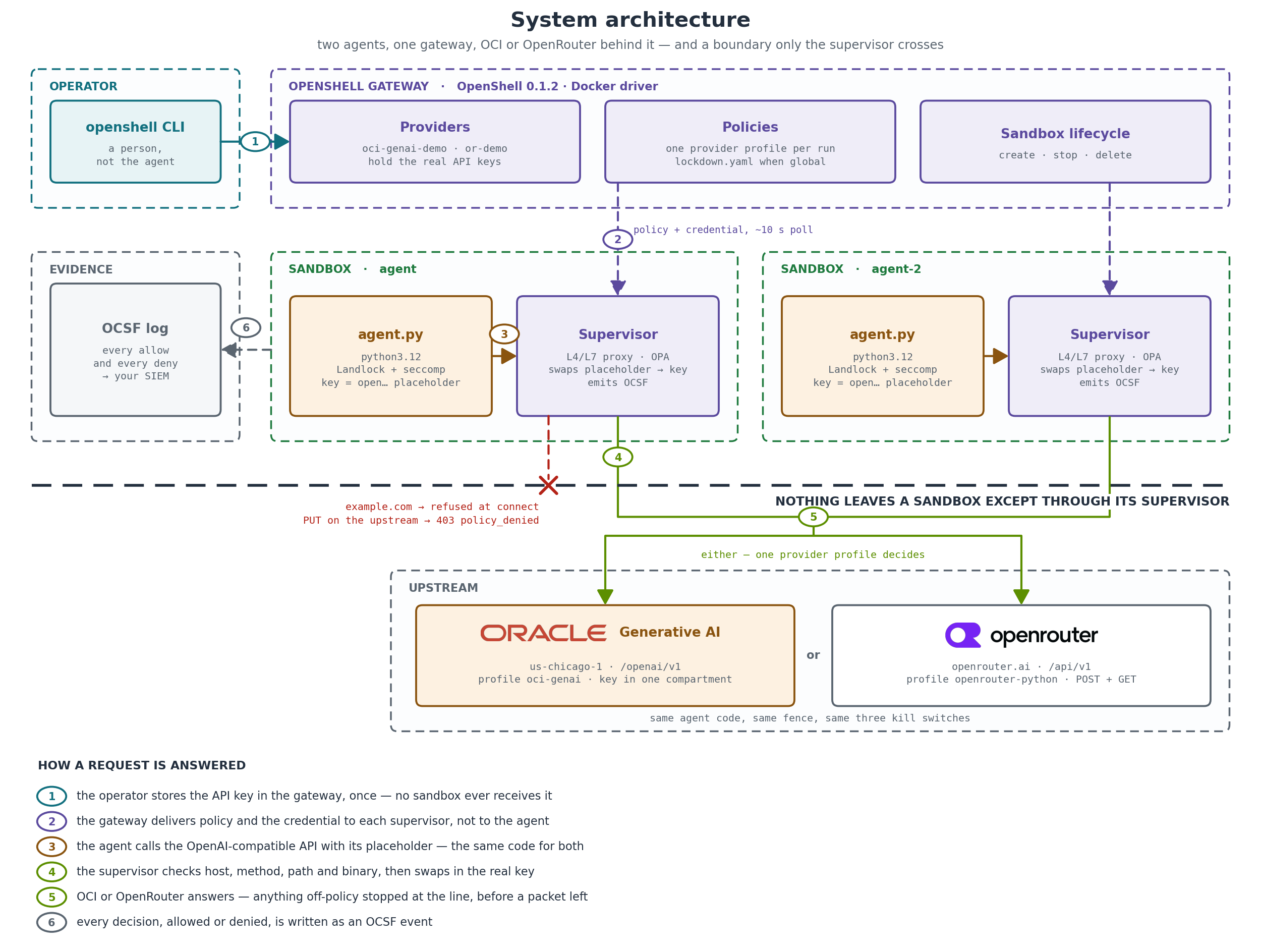
OpenShell is an open-source Rust runtime, Apache-2.0. It moves every control out of the agent and into the hands of an operator:
- The sandbox. The agent runs under Landlock and seccomp with no default egress. Its only way out is a supervisor next to it.
- The supervisor. A proxy that denies by default and allows a request only if the host, the method, the path and the calling binary are in policy. It swaps placeholder credentials for real ones on the way out, only for the host each belongs to.
- The gateway. The control plane — policies, credentials, sandbox lifecycle — reached by the operator over mTLS. This is where the kill switch lives.
- The evidence. Every allow and every deny is an OCSF event, ready for a SIEM.
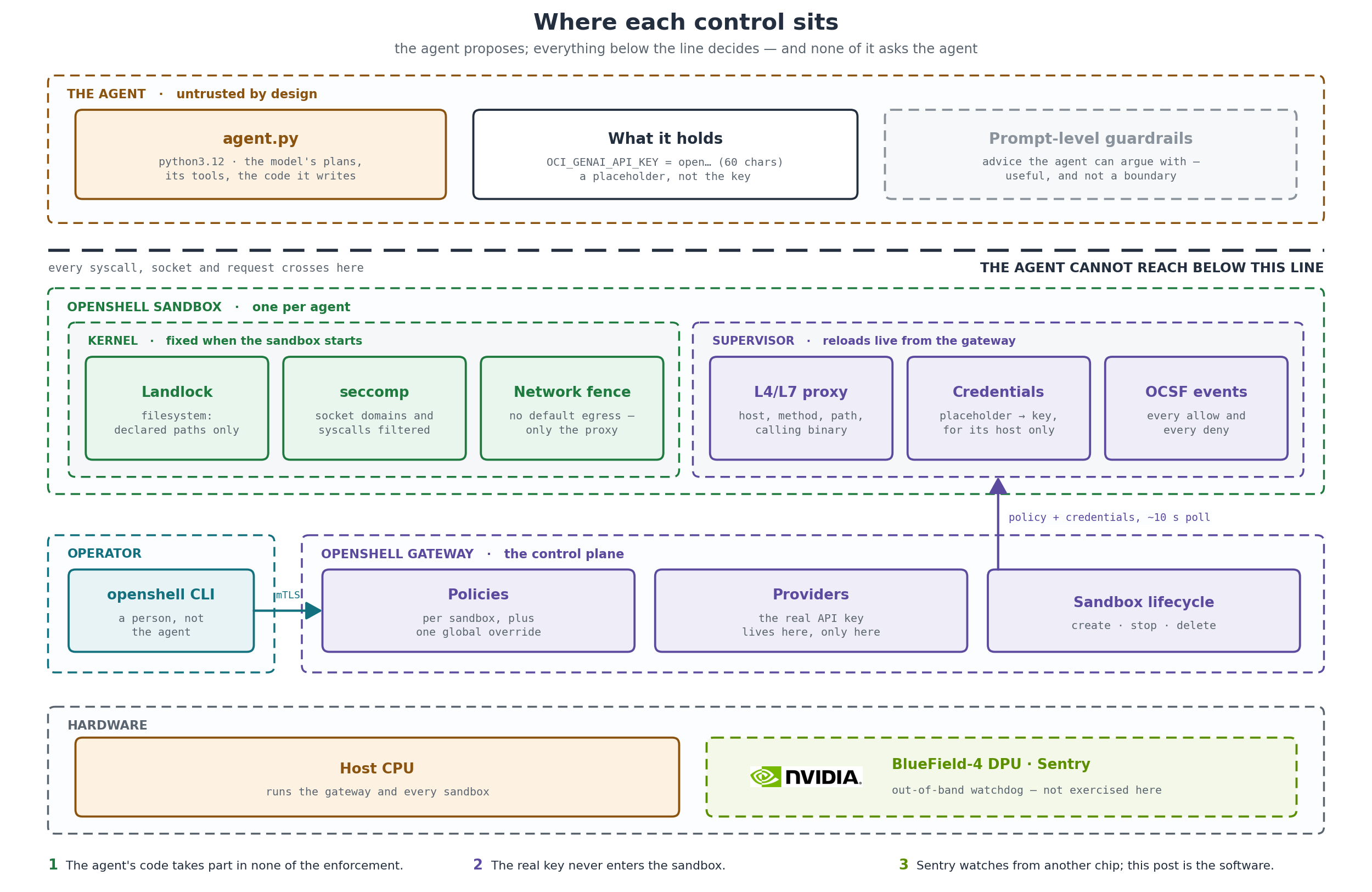
The operator never asks the agent to stop. The operator changes what the world lets the agent do.
Three words carry the rest of the post:
- Provider — a credential stored in the gateway under a name, such as
or-demo. You attach it to a sandbox; the agent never receives it. - Profile — the rules that come with a provider: which hosts, which methods and paths, and which program inside the sandbox may use it.
- Placeholder — what the agent finds where the key would be, such as
openshell:resolve:env:v68…_OPENROUTER_API_KEY. The proxy swaps it for the real key on the way out, and only toward the provider's host. Stolen, it is worthless.
Oracle Cloud support
When the platform launched, OpenShell supported AWS and Google Cloud credentials but not Oracle Cloud. I opened a tracking issue the next day and contributed OCI support in three phases, each one shrinking what an agent on OCI has to hold:
| Phase | What it gives an agent on OCI | Status |
|---|---|---|
Bearer profile oci-genai |
OCI Generative AI through the OpenAI-compatible endpoint, with the key injected by the proxy | merged, #3904 |
| Proxy-side signing | native OCI APIs such as Object Storage, signed by the proxy | open, #3962 |
| Gateway-minted principals | no long-lived key at all: short-lived tokens from the gateway's own OCI identity | draft, #3975 |
The demo uses the first phase, which you can import from the NVIDIA repository today.
The demo
The agent is about 170 lines of standard-library Python that calls an OpenAI-compatible API. It runs in an OpenShell sandbox with one provider profile attached, and the profile alone decides three things: the key lives in the gateway, egress is limited to the provider's host and API paths, and only the agent's Python interpreter may connect. Two sandboxes share the provider so the kill switch has a fleet to hit.
This is the whole of what the OCI profile allows — one host pattern, three methods under one path, one binary:
endpoints:
  - host: "inference.generativeai.*.oci.oraclecloud.com"
    port: 443
    protocol: rest
    enforcement: enforce
    rules:
      - allow: { method: POST, path: "/openai/v1/**" }
      - allow: { method: GET, path: "/openai/v1/**" }
      - allow: { method: DELETE, path: "/openai/v1/**" }
binaries: [/usr/local/bin/python3.12]
The scenes below are from the first run, against OCI Generative AI in us-chicago-1 with meta.llama-3.3-70b-instruct. The OpenRouter runs are identical apart from the host and the model name.
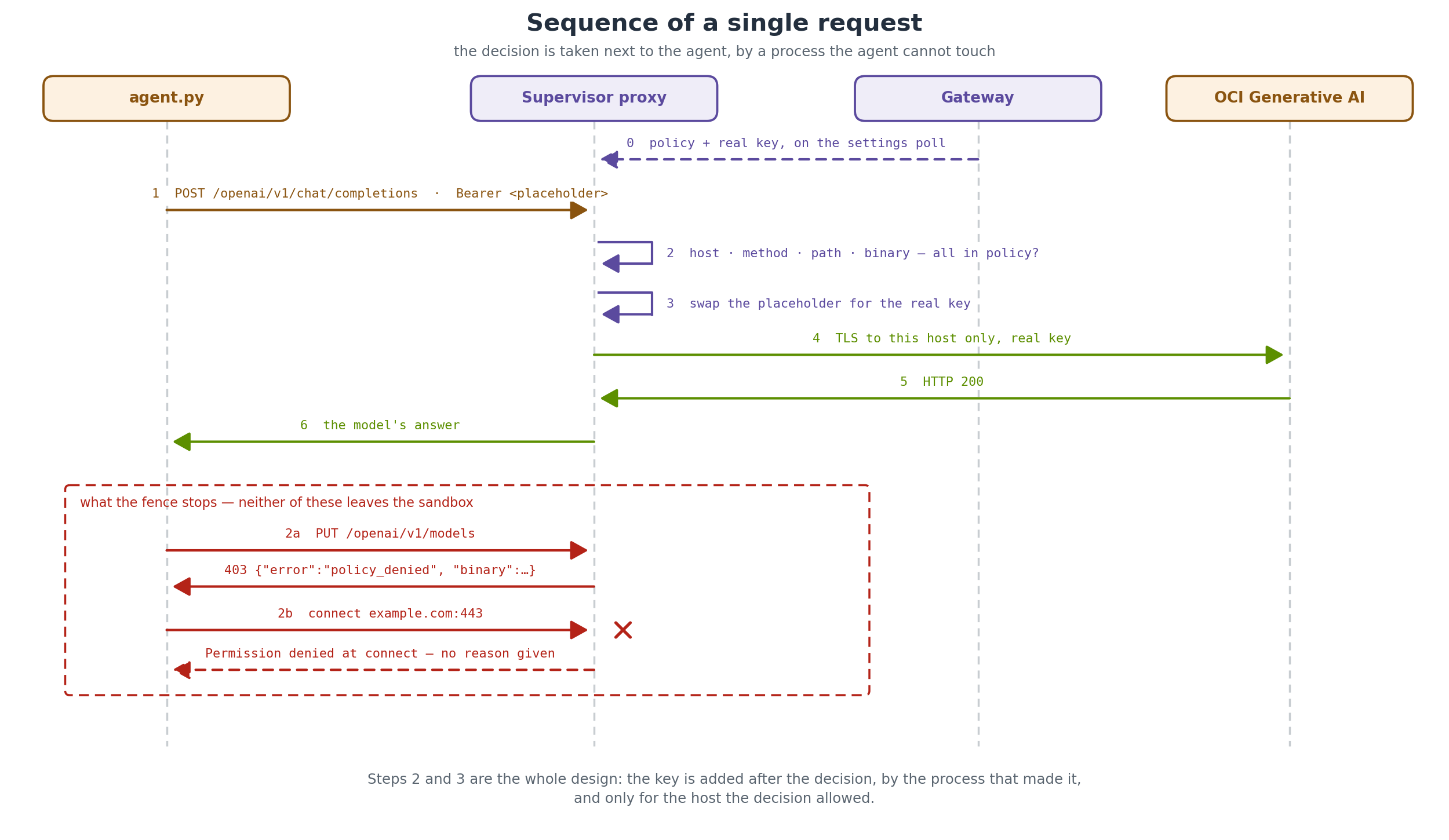
What the agent sees. Not the key: an OpenShell placeholder, useless anywhere but inside this sandbox and only toward one host. (The current agent prints it in full, for example openshell:resolve:env:v9376…_OCI_GENAI_API_KEY.)
OCI_GENAI_API_KEY as seen by the agent : open… (60 chars)
looks like a real OCI GenAI key         : no
allowed upstream                        : inference.generativeai.us-chicago-1.oci.oraclecloud.com
Real work. The proxy swaps in the key on the way out, and OCI answers:
$ agent ask "In one sentence, why should an autonomous agent run inside a sandbox?"
HTTP 200: An autonomous agent should run inside a sandbox to prevent potential security
risks and damage to the host system by isolating its execution and limiting its access.
The fence. One allowed request and two that must not get through:
allowed : POST chat completions on the OCI GenAI host        -> HTTP 200
blocked : GET  an unlisted host (example.com)                -> DENIED  [Errno 13] Permission denied
blocked : PUT  on the OCI GenAI host (method not in policy)  -> DENIED  {"binary":"/usr/local/bin/python3.12",
                                                                "detail":"PUT /openai/v1/models not permitted by policy",
                                                                "error":"policy_denied"}
The unlisted host is refused at connect, before a packet leaves. The disallowed method is refused at the HTTP layer, with a reason the agent can read. Nothing in the agent's code decided either.
The kill switch, three levels
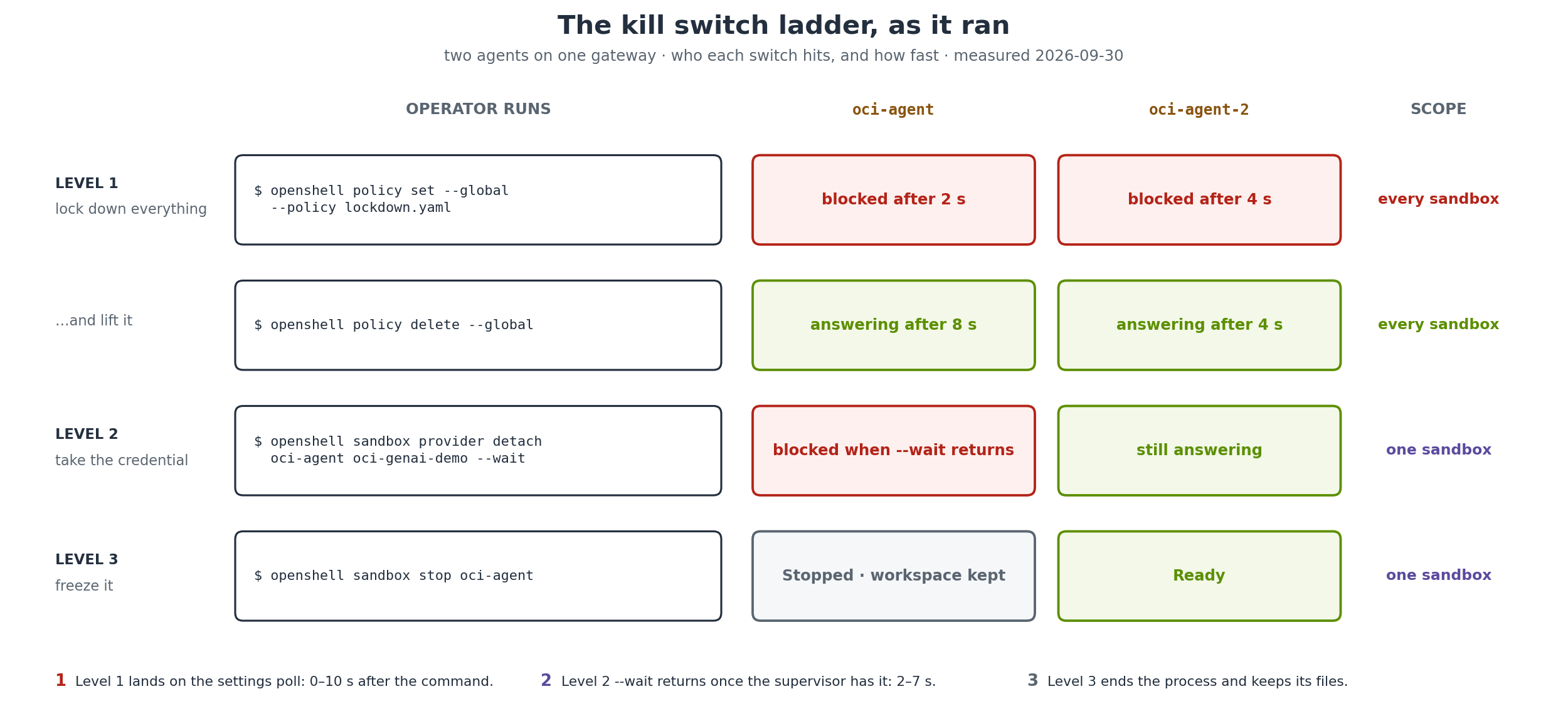
A worker loop in the first sandbox asks the model for a status line every five seconds. The operator acts from the gateway while both agents run. demo.sh drives all three levels and checks each one.
Level 1: lock down everything. One command sets a global policy with no network rules — lockdown.yaml is two lines:
$ openshell policy set --global --policy policies/lockdown.yaml --yes
  -> oci-agent   blocked after 2 s: [Errno 13] Permission denied
  -> oci-agent-2 blocked after 4 s: [Errno 13] Permission denied

[19:39:10] ok      #2: We're making great progress and on track to meet our goals!
[19:39:15] BLOCKED #3: URLError: <urlopen error [Errno 13] Permission denied>
openshell policy delete --global lifts it, and both agents answer again.
Level 2: take the credential away from one agent. The other never notices:
$ openshell sandbox provider detach oci-agent oci-genai-demo --wait
oci-agent / oci-genai-demo: revoked
  -> oci-agent   blocked after 0 s: [Errno 13] Permission denied
  -> oci-agent-2 reachable after 2 s: HTTP 200: Yes, I am still here.
Level 3: freeze it. Stopping the sandbox ends the process and keeps its files for investigation:
$ openshell sandbox stop oci-agent
oci-agent    Stopped
oci-agent-2  Ready
| Level | Command | Scope | Time to effect | Undo |
|---|---|---|---|---|
| 1 | policy set --global |
every sandbox | 0–10 s after the command | policy delete --global, 1–19 s |
| 2 | sandbox provider detach --wait |
one sandbox | done when the command returns, 2–7 s | sandbox provider attach |
| 3 | sandbox stop |
one sandbox | immediate | sandbox start |
Level 1 lands on each supervisor's next settings poll. Level 2 lands on the same poll, but --wait holds the command until it has, so the credential is gone by the time your prompt returns. In timed trials against an agent making a request every second, a running agent was refused 7–9 s after a lockdown and within a second of detach --wait returning.
Every decision is also an OCSF event from the supervisor. The one that matters most is the last:
OCSF NET:OPEN  [MED]  DENIED /usr/local/bin/python3.12(0) -> example.com:443 [reason:transparent_tcp_policy_denied]
OCSF HTTP:PUT  [MED]  DENIED PUT .../openai/v1/models [policy:_provider_oci_genai_demo engine:l7] [reason:L7_REQUEST deny PUT]
OCSF CONFIG:LOADED [INFO] Policy reloaded successfully (global) [policy_hash:1b621527d93a...]
OCSF NET:OPEN  [MED]  DENIED inference.generativeai.us-chicago-1.oci.oraclecloud.com:443 [reason:L7 tunnel closed before inspection because policy changed: policy generation is stale]
When the policy changes, the proxy closes connections opened under the old rules. An agent mid-request when the lockdown lands does not get to finish.
Bring your own agent
The demo agent is deliberately plain. The point of OpenShell is that yours does not need to change either. The examples run the official OpenAI Python SDK and LangChain in a sandbox with the same provider. All either library is given is a base_url and an API key variable — which holds the placeholder:
import os
from openai import OpenAI

client = OpenAI(
    base_url=os.environ["AGENT_BASE_URL"],            # OCI Generative AI or OpenRouter
    api_key=os.environ[os.environ["AGENT_KEY_ENV"]],  # the placeholder, not the key
)
reply = client.chat.completions.create(
    model=os.environ["AGENT_MODEL"],
    messages=[{"role": "user", "content": "In one short sentence: what does a sandbox protect?"}],
)
print(reply.choices[0].message.content)
LangChain works the same way, including tool calls: the model decides to call a tool, the tool runs inside the sandbox, and the only traffic that leaves goes to the provider's host.
import os
from langchain_core.tools import tool
from langchain_openai import ChatOpenAI

@tool
def add(a: int, b: int) -> int:
    """Add two integers."""
    return a + b

llm = ChatOpenAI(base_url=os.environ["AGENT_BASE_URL"],
                 api_key=os.environ[os.environ["AGENT_KEY_ENV"]], model=os.environ["AGENT_MODEL"])
msg = llm.bind_tools([add]).invoke("Use the add tool to compute 1234 + 4321.")
for call in msg.tool_calls:
    print(call["name"], call["args"], "->", add.invoke(call["args"]))
Against both providers:
OPENROUTER_API_KEY = openshell:resolve:env:v6892894447447880484_OPENROUTER_API_KEY
openai sdk -> A sandbox protects a system or environment from untested or potentially malicious code or activities.
langchain tool call -> [('add', {'a': 1234, 'b': 4321})]
langchain tool result -> 5555
One rule to carry over to your own image: the profile's binaries must name the interpreter that makes the calls. These examples add the libraries to the demo's base image, so /usr/local/bin/python3.12 still applies.
Run it step by step

You need Linux, macOS on Apple Silicon, or WSL 2, with Docker running. The README has every detail, including troubleshooting; this is the path.
1. Install OpenShell. This gives you the openshell CLI and a local gateway — the control plane every later command talks to. The demo was tested on 0.1.2:
curl -LsSf https://raw.githubusercontent.com/NVIDIA/OpenShell/main/install.sh | OPENSHELL_VERSION=v0.1.2 sh
openshell status
git clone https://github.com/fede-kamel/openshell-oci-kill-switch-demo && cd openshell-oci-kill-switch-demo
Checkpoint: openshell status prints Status: Connected. If it does not, the gateway is not running yet and nothing below will work.
2a. Store an OpenRouter key in the gateway. No cloud account needed, and a run costs a fraction of a cent. The profile import teaches the gateway what an OpenRouter provider may do; provider create stores the key. read -rs keeps the key off the screen and out of your shell history, and naming the variable without a value keeps it off the command line:
openshell provider profile import --file demo/profile/openrouter-python.yaml --global
read -rs OPENROUTER_API_KEY && export OPENROUTER_API_KEY
openshell provider create --name or-demo --type openrouter-python --credential OPENROUTER_API_KEY
Checkpoint: ✓ Created provider or-demo, and openshell provider list shows it with type openrouter-python.
2b. Or store an OCI Generative AI key. — create the IAM policy before the key; a key created first can stay unauthorised, and OCI returns the same 401 either way:
allow any-user to use generative-ai-family in compartment id <compartment-ocid>
  where ALL {request.principal.type='generativeaiapikey'}
oci generative-ai api-key create --compartment-id <compartment-ocid> --region us-chicago-1 \
  --display-name openshell-demo --key-details '[{"keyName":"primary","timeExpiry":"2027-01-01T00:00:00Z"}]'
openshell provider profile import --file demo/profile/oci-genai-python.yaml --global
read -rs OCI_GENAI_API_KEY && export OCI_GENAI_API_KEY
openshell provider create --name oci-genai-demo --type oci-genai-python --credential OCI_GENAI_API_KEY
Checkpoint: ✓ Created provider oci-genai-demo.
3. Run the demo, then the examples. The runbook creates two sandboxes, walks through every scene in this post, and checks each one:
TARGET=openrouter ./demo/demo.sh          # or TARGET=oci
TARGET=openrouter ./examples/run-examples.sh
Checkpoint: the runbook ends with ALL 13 CHECKS PASSED, the examples with ALL EXAMPLES PASSED. A run takes two to three minutes, longer the first time while Docker pulls the image. It changes gateway-wide state, so it is careful: it refuses to start if a global policy is already in force or other sandboxes are running, and whatever happens — a failure, Ctrl-C, a CI job cancelled mid-lockdown — it lifts its own lockdown and removes its sandboxes. The key stays in the gateway; nothing in the repository or its logs contains one.
Beyond the API key
The demo uses a bearer API key. The two open pull requests change what the gateway holds — and what could leak if a sandbox were breached — without changing the kill switch:
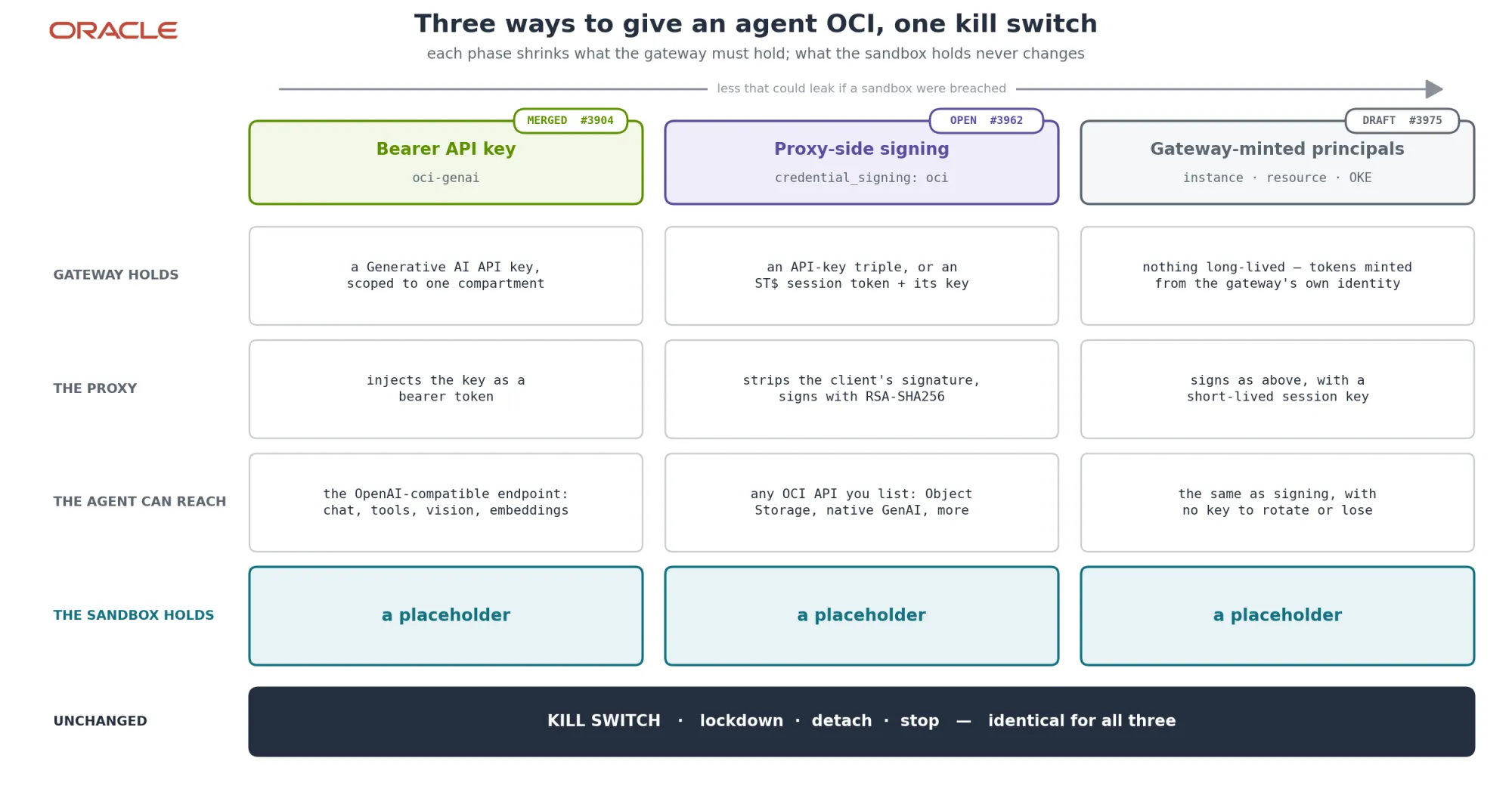
Two things already hold with the key. Rotating it is an OCI command (oci generative-ai api-key renew) and a gateway update (openshell provider update); no sandbox is touched, because no sandbox ever held the value. And the OCSF events can go straight to whatever SIEM watches the rest of your estate.
Worth knowing before you try it
binariesmust name the interpreter in your image. Rules bind to the executable, not to the container.- A refused host gives the agent no reason. The 403 for a refused method explains itself; a connect-time denial is only explained in the supervisor log.
- Lifting is slower than locking. Script a lockdown drill to poll for the lift, not to sleep.
sandbox execin scripts needs stdin from/dev/null. It waits for piped input to close before starting (#3993; fix in review, #4006).- In 0.1.2, a new sandbox's first settings poll can drop a request. Retry once on a closed connection (#3994; already fixed on
mainby #3819).
What this does not show: the hardware layer — Sentry is not exercised here — or behaviour at scale. Every run used a laptop gateway with the Docker driver, two agents at a time, and policies in enforce mode.
Disclaimer
This is my personal blog. The views here are my own and do not represent my employer. Nothing in this post is an Oracle publication, announcement, product commitment, or statement of Oracle's plans.
Everything was built and tested with my own resources: my own Oracle Cloud and OpenRouter accounts and my own machines. The OpenShell contributions described here are mine, made as an individual open-source contributor.
All output is from real runs on 2026-09-30 on OpenShell 0.1.2 with the Docker driver: the first run on one laptop, then reruns, the examples and a fresh-clone certification of both providers on a second. No API keys appear in this post or in the demo repository.
NVIDIA, OpenShell, BlueField, Oracle and OpenRouter are trademarks of their respective owners. The OpenShell logo and the launch-partner image are NVIDIA's, from the OpenShell repository and NVIDIA's announcement; the Oracle and OpenRouter logos are their owners'. All appear here only to identify what is described, and none implies endorsement. Quotes are from NVIDIA's announcement and TechCrunch's report of it.
Next steps
- Run the demo: fede-kamel/openshell-oci-kill-switch-demo —
TARGET=ociorTARGET=openrouter. - Put your own agent in a sandbox: start from
examples/. - Use the OCI profile:
providers/oci-genai.yamlin the OpenShell repository, with the OCI-side setup in its header. - Follow the next two phases: request signing in #3962, gateway-minted principals in #3975.